

Design Terraria Structures with AI and Export Them as .twpack
Ask ChatGPT, Claude, or Gemini for a Terraria build, open its link in Structure Studio, check it in Real View, send the problems back to the AI, and export a .twpack. It works in a browser, even on a phone.

AI chat assistants are surprisingly good at planning a Terraria build: they know which furniture an NPC house needs, how a castle is laid out, and which blocks suit a desert temple. What they cannot do is place tiles. They do not know Terraria's internal tile IDs, furniture frames, or slope values, and a guessed number turns a chair into a torch.
Structure Studio closes that gap. The AI writes a short structure spec that uses the names you see in game, such as Gray Brick, Wooden Chair, or Red Dynasty Shingles. Structure Studio turns those names into real tiles in your browser, shows the result in Real View, and exports it as a .twpack package. Nothing is uploaded, nothing needs to be installed, and it works with the free web versions of ChatGPT, Claude, and Gemini, including on a phone.
Step 1: Give the AI the TerraWorld guide
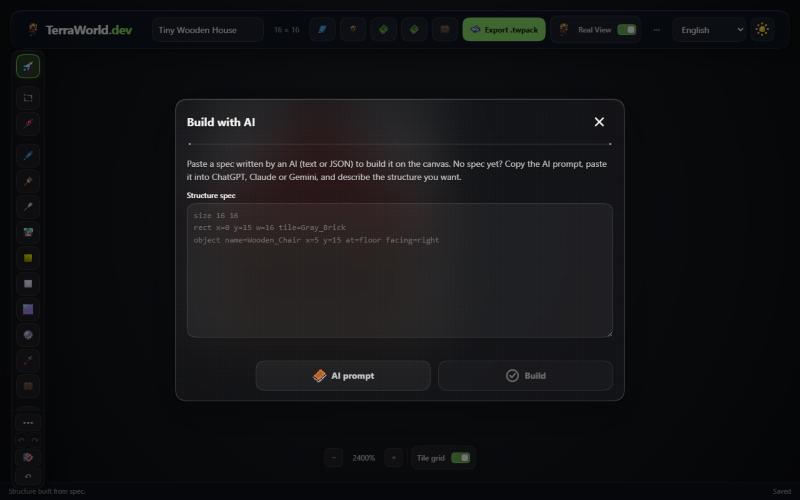
- Open Structure Studio and press the AI button in the top bar.
- Press AI prompt. It copies a short message that points the AI to
https://terraworld.dev/llms.txt, a page written for AI assistants that explains the spec format, the names they may use, and the rules furniture must follow in game. - Paste the message into your AI chat and add a description of the build you want.
If you prefer to type it yourself, any message that mentions the link works, for example: "Read https://terraworld.dev/llms.txt, then design a two-storey wooden NPC house for the Guide and the Merchant and give me the Structure Studio link." If your AI cannot open links, open terraworld.dev/llms.txt yourself and paste its text into the chat.
Use AI often? The AI skill builder sets your AI up once: a skill file for Claude, instructions and files for a ChatGPT Project or a Gemini Gem, or a starter prompt for any AI. After that you only describe the build.
Step 2: Describe the build clearly
The AI decides every coordinate, so a clear request saves several rounds of fixes. A good description usually includes:
- Size: for example "about 40 tiles wide and 30 tall". Small and medium builds work best; split very large projects into parts.
- Style and materials: "gray brick with a blue shingle roof", "boreal wood cabin", "sandstone desert temple".
- Rooms and purpose: "three NPC rooms, each with a door, a table, a chair, and a torch", or "a throne room with banners and chandeliers".
- Details you care about: stairs made of platforms, windows of stained glass, a chest with starter items, a sign with text.
Mention Terraria version features only if you need them. The spec uses vanilla Terraria names; tiles from other mods are not available yet.
Step 3: Open the AI's link
The AI answers with a spec and a link that starts with https://terraworld.dev/structure-studio#spec= or #z=. Open it. Structure Studio builds the structure immediately on its canvas. The design travels inside the link itself after the #, so it never reaches the TerraWorld server.
When a link is too long for the chat app, or it breaks when you copy it, use the spec text instead: copy the block the AI wrote, press AI in Structure Studio, paste it into Structure spec, and press Build. You can also save the text as a .twspec file and open it with the Open button.
Step 4: Check it in Real View
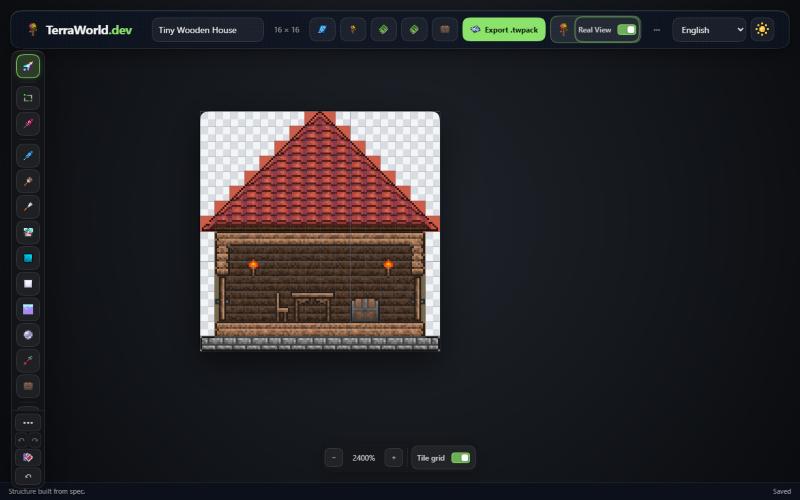
Turn on Real View to see the build with game textures. Zoom in and look for things the AI may have misjudged: doors that open into a wall, furniture floating above the floor, rooms without a background wall, or a roof that does not cover the building. The AI cannot see the picture, so describe what is wrong in plain words, or take a screenshot and send it. Most AI chat apps understand images.
Step 5: Send problems back to the AI
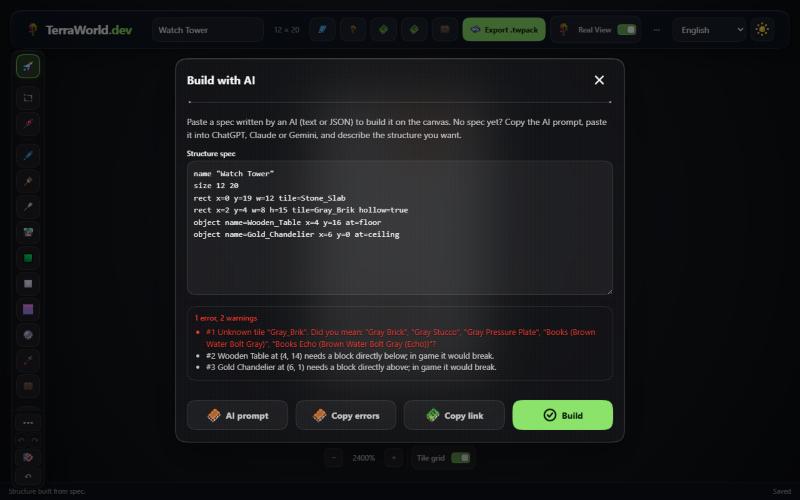
Structure Studio checks every spec while building it. When something is wrong, the AI dialog opens with a list:
- Errors are things that could not be built: an unknown name (with the closest real names), a cell outside the canvas, or a later step that draws blocks over furniture.
- Warnings are things that would break in game: a table with no floor under it, a chandelier with nothing to hang from, a door without a block above and below, or a painting without a wall behind it.
Press Copy errors and paste the report into the chat. It tells the AI exactly which step failed and why, so it can send a corrected spec. Repeat until the list is empty. Small fixes are often faster to make yourself with the Edit Mode tools, since the built structure is a normal Structure Studio document.
Step 6: Polish, export, and share
Once the build looks right, it behaves like any other Structure Studio design. Use layers, paint, wiring, and the other editing tools to finish it, then press Export .twpack. You can place the package in a world with the map editor, share it with friends, or build it inside Terraria with the TerraWorld Blueprints mod.
To share the AI version before editing, press Copy link in the AI dialog. The link contains the whole spec, so anybody who opens it gets the same build.
What a spec looks like
You never have to write a spec yourself, but reading one helps when you want to tweak a number. Each line is one step. Coordinates count cells from the top-left corner, and y grows downwards:
name "Tiny Wooden House"
size 16 16
roof x=0 y=7 w=16 tile=Red_Dynasty_Shingles
rect x=1 y=8 w=14 h=7 tile=Wood hollow=true
rect x=2 y=9 w=12 h=5 wall=Wood_Wall
rect x=0 y=15 w=16 h=1 tile=Gray_Brick
clear x=1 y=11 h=3
object name=Wooden_Door x=1 y=14 at=floor
object name=Wooden_Table x=6 y=14 at=floor
object name=Wooden_Chair x=5 y=14 at=floor facing=right
object name=Wooden_Chest x=10 y=14 at=floor items=Torch_x10,Wood_x50
object name=Torch x=3 y=10
rectfills an area with a block, a wall, paint, or liquid;hollow=truedraws only the outline.roofdraws a 45° roof with sloped edges.clearcuts openings such as door frames.objectplaces furniture.at=floormeans "standing on this row",at=ceilingmeans "hanging from this row", andfacingturns chairs and beds.griddraws small details character by character, which is handy for windows and decorations.- Underscores stand for spaces, so
Gray_Brickis the same asGray Brick.
The full reference, including JSON form, paints, liquids, and slopes, is in terraworld.dev/llms.txt.
Tips for better results
- Ask for one building at a time. A single house or tower comes out cleaner than a whole town in one message.
- Ask the AI to keep NPC rooms valid: walls and background walls without gaps, a light source, a table, a chair, and a door.
- If the AI keeps inventing names, ask it to check the name lists at
terraworld.dev/ai/blocks.txt,walls.txt, andobjects.txt. - Chest contents in a spec are kept in the
.twpack, but the TerraWorld Blueprints mod does not copy them into the game, so players cannot duplicate items with a blueprint. - AI assistants that can run code, such as coding agents, can also use the
npm run structurecommand in the TerraWorld repository to search names, check a spec, and render a preview without a browser.